<?xml version="1.0" encoding="utf-8"?>
<feed xmlns="http://www.w3.org/2005/Atom">
  <author>
    <name>玖璃</name>
  </author>
  <generator uri="https://hexo.io/">Hexo</generator>
  <id>https://exschwi.github.io/</id>
  <link href="https://exschwi.github.io/" rel="alternate"/>
  <link href="https://exschwi.github.io/atom.xml" rel="self"/>
  <rights>All rights reserved 2026, 玖璃</rights>
  <subtitle>玖璃子</subtitle>
  <title>栗子的糖果屋</title>
  <updated>2026-09-06T08:27:49.169Z</updated>
  <entry>
    <author>
      <name>玖璃</name>
    </author>
    <category term="学习" scheme="https://exschwi.github.io/tags/%E5%AD%A6%E4%B9%A0/"/>
    <content>
      <![CDATA[<p>Welcome to <a href="https://hexo.io/">Hexo</a>! This is your very first post. Check <a href="https://hexo.io/docs/">documentation</a> for more info. If you get any problems when using Hexo, you can find the answer in <a href="https://hexo.io/docs/troubleshooting.html">troubleshooting</a> or you can ask me on <a href="https://github.com/hexojs/hexo/issues">GitHub</a>.</p><h2 id="Quick-Start"><a href="#Quick-Start" class="headerlink" title="Quick Start"></a>Quick Start</h2><h3 id="Create-a-new-post"><a href="#Create-a-new-post" class="headerlink" title="Create a new post"></a>Create a new post</h3><figure class="highlight bash"><table><tr><td class="gutter"><pre><span class="line">1</span><br></pre></td><td class="code"><pre><span class="line">$ hexo new <span class="string">&quot;My New Post&quot;</span></span><br></pre></td></tr></table></figure><p>More info: <a href="https://hexo.io/docs/writing.html">Writing</a></p><h3 id="Run-server"><a href="#Run-server" class="headerlink" title="Run server"></a>Run server</h3><figure class="highlight bash"><table><tr><td class="gutter"><pre><span class="line">1</span><br></pre></td><td class="code"><pre><span class="line">$ hexo server</span><br></pre></td></tr></table></figure><p>More info: <a href="https://hexo.io/docs/server.html">Server</a></p><h3 id="Generate-static-files"><a href="#Generate-static-files" class="headerlink" title="Generate static files"></a>Generate static files</h3><figure class="highlight bash"><table><tr><td class="gutter"><pre><span class="line">1</span><br></pre></td><td class="code"><pre><span class="line">$ hexo generate</span><br></pre></td></tr></table></figure><p>More info: <a href="https://hexo.io/docs/generating.html">Generating</a></p><h3 id="Deploy-to-remote-sites"><a href="#Deploy-to-remote-sites" class="headerlink" title="Deploy to remote sites"></a>Deploy to remote sites</h3><figure class="highlight bash"><table><tr><td class="gutter"><pre><span class="line">1</span><br></pre></td><td class="code"><pre><span class="line">$ hexo deploy</span><br></pre></td></tr></table></figure><p>More info: <a href="https://hexo.io/docs/one-command-deployment.html">Deployment</a></p>]]>
    </content>
    <id>https://exschwi.github.io/posts/4a17b156.html</id>
    <link href="https://exschwi.github.io/posts/4a17b156.html"/>
    <published>2026-09-06T08:27:49.169Z</published>
    <summary>
      <![CDATA[<p>Welcome to <a href="https://hexo.io/">Hexo</a>! This is your very first post. Check <a href="https://hexo.io/docs/">documentation</a> for]]>
    </summary>
    <title>Hello World</title>
    <updated>2026-09-06T08:27:49.169Z</updated>
  </entry>
  <entry>
    <author>
      <name>玖璃</name>
    </author>
    <category term="学习" scheme="https://exschwi.github.io/categories/%E5%AD%A6%E4%B9%A0/"/>
    <category term="学习" scheme="https://exschwi.github.io/tags/%E5%AD%A6%E4%B9%A0/"/>
    <content>
      <![CDATA[<h1 id="VScode-实现末尾加分号-然后自动换行"><a href="#VScode-实现末尾加分号-然后自动换行" class="headerlink" title="VScode 实现末尾加分号;然后自动换行"></a>VScode 实现末尾加分号;然后自动换行</h1><p>1.先安装插件 multi-command</p><p>2.在文件——首选项——键盘快捷方式——右上角打开键盘快捷方式(JSON)</p><p>3.在 kedbindings.json 的[]中输入</p><figure class="highlight plaintext"><table><tr><td class="gutter"><pre><span class="line">1</span><br><span class="line">2</span><br><span class="line">3</span><br><span class="line">4</span><br><span class="line">5</span><br><span class="line">6</span><br><span class="line">7</span><br><span class="line">8</span><br><span class="line">9</span><br><span class="line">10</span><br><span class="line">11</span><br><span class="line">12</span><br><span class="line">13</span><br><span class="line">14</span><br><span class="line">15</span><br><span class="line">16</span><br><span class="line">17</span><br><span class="line">18</span><br><span class="line">19</span><br><span class="line">20</span><br><span class="line">21</span><br></pre></td><td class="code"><pre><span class="line">&#123;</span><br><span class="line">    &quot;key&quot;: &quot;ctrl+;&quot;,</span><br><span class="line">    &quot;command&quot;: &quot;extension.multiCommand.execute&quot;,</span><br><span class="line">    &quot;args&quot;: &#123;</span><br><span class="line">      &quot;sequence&quot;: [</span><br><span class="line">        &#123;</span><br><span class="line">          &quot;command&quot;: &quot;cursorEnd&quot;</span><br><span class="line">        &#125;,</span><br><span class="line">        &#123;</span><br><span class="line">          &quot;command&quot;: &quot;type&quot;,</span><br><span class="line">          &quot;args&quot;: &#123;</span><br><span class="line">            &quot;text&quot;: &quot;;&quot;</span><br><span class="line">          &#125;</span><br><span class="line">        &#125;,</span><br><span class="line">        &#123;</span><br><span class="line">          &quot;command&quot;: &quot;editor.action.insertLineAfter&quot;</span><br><span class="line">        &#125;</span><br><span class="line">      ]</span><br><span class="line">    &#125;,</span><br><span class="line">    &quot;when&quot;: &quot;editorTextFocus&quot;</span><br><span class="line">  &#125;</span><br></pre></td></tr></table></figure><p>4.在使用的时候按 ctrl+:即可实现</p>]]>
    </content>
    <id>https://exschwi.github.io/posts/31745.html</id>
    <link href="https://exschwi.github.io/posts/31745.html"/>
    <published>2024-07-25T15:52:18.000Z</published>
    <summary>
      <![CDATA[<h1 id="VScode-实现末尾加分号-然后自动换行"><a href="#VScode-实现末尾加分号-然后自动换行" class="headerlink" title="VScode 实现末尾加分号;然后自动换行"></a>VScode 实现末尾加分号;然后自动换行</]]>
    </summary>
    <title>VScode实用插件</title>
    <updated>2026-09-06T08:27:49.169Z</updated>
  </entry>
  <entry>
    <author>
      <name>玖璃</name>
    </author>
    <category term="学习" scheme="https://exschwi.github.io/categories/%E5%AD%A6%E4%B9%A0/"/>
    <content>
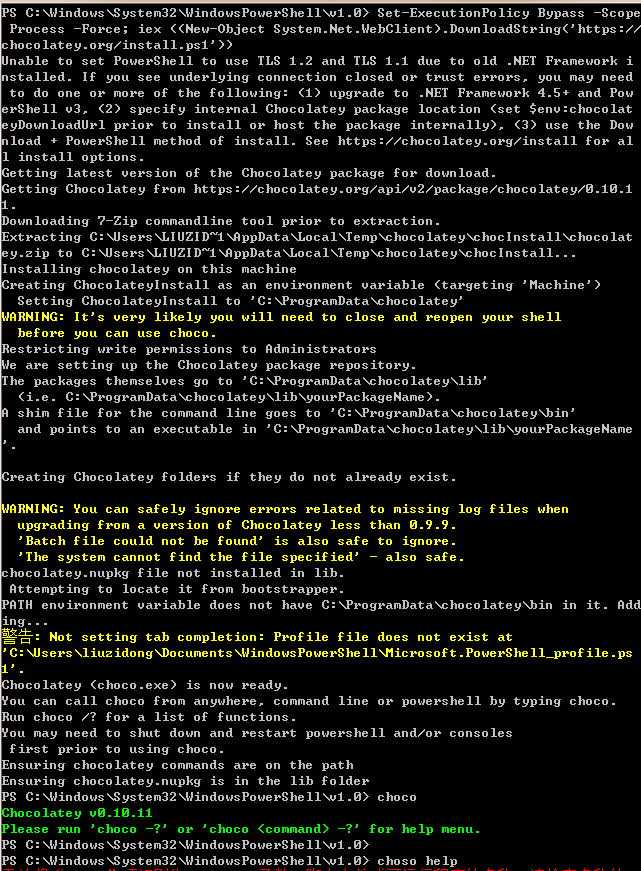
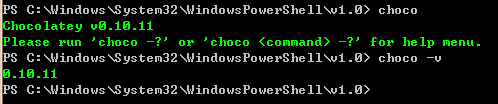
      <![CDATA[<h1 id="windows-下安装-Chocolatey（强大的软件包管理工具）"><a href="#windows-下安装-Chocolatey（强大的软件包管理工具）" class="headerlink" title="windows 下安装 Chocolatey（强大的软件包管理工具）"></a>windows 下安装 Chocolatey（强大的软件包管理工具）</h1><p>Chocolatey 只是把官方下载路径封装到了 Chocolatey 中，所以下载源都是其官方路径，所以下载的一定是合法的，但是如果原软件是需要 Licence 注册的话，那么 Chocolatey 下载安装好的软件还是需要你去购买注册。不过 Chocolatey 一般还是会选用免费 Licence 可用的软件。</p><p>1.右键开始图标</p><p><img src="images/image-20240823101600381.png" alt="image-20240823101600381"></p><p>2.Windows PowerShell（管理员）运行</p><p>执行以下命令：</p><figure class="highlight plaintext"><table><tr><td class="gutter"><pre><span class="line">1</span><br></pre></td><td class="code"><pre><span class="line">Set-ExecutionPolicy Bypass -Scope Process -Force; iex ((New-Object System.Net.WebClient).DownloadString(&#x27;https://chocolatey.org/install.ps1&#x27;))</span><br></pre></td></tr></table></figure><p>3.等待一段时间，出现版本号安装成功</p><p><img src="https://i-blog.csdnimg.cn/blog_migrate/980155e56a70c811d7de2a568afc202f.jpeg" alt="img"></p><p>4.查看版本号</p><p><img src="https://i-blog.csdnimg.cn/blog_migrate/f30cb6ef42672cb84c955c5794f76fd6.jpeg" alt="img"></p><p>5.Chocolatey 用法：命令</p><p>search - 搜索包 choco search something<br>list - 列出包 choco list -lo<br>install - 安装 choco install baretail<br>pin - 固定包的版本，防止包被升级 choco pin windirstat<br>upgrade - 安装包的升级 choco upgrade baretail<br>uninstall - 安装包的卸载 choco uninstall baretail<br>安装 Ruby Gem - choco install compass -source ruby<br>安装 Python Egg - choco install sphynx -source python<br>安装 IIS 服务器特性 - choco install IIS -source windowsfeatures<br>安装 Webpi 特性 - choco install IIS7.5Express -source webpi</p><p>常用的一些命令</p><p>列出本地已安装的包 ：choco list —local-only</p><p>列出 Windows 系统已安装的软件：choco list -li OR choco list -lai</p><p>升级所有已安装的包：choco upgrade all -y</p><p>mysql 安装：choco install mysql -y</p><p>maven 安装：choco install maven</p><p>升级 maven：choco upgrade maven</p><p>java 安装 ： choco install jdk7，choco install jdk8</p><figure class="highlight plaintext"><table><tr><td class="gutter"><pre><span class="line">1</span><br><span class="line">2</span><br><span class="line">3</span><br><span class="line">4</span><br><span class="line">5</span><br><span class="line">6</span><br><span class="line">7</span><br><span class="line">8</span><br><span class="line">9</span><br><span class="line">10</span><br><span class="line">11</span><br><span class="line">12</span><br></pre></td><td class="code"><pre><span class="line">choco install autohotkey.portable    #安装 AutoHotkey (Portable)</span><br><span class="line">choco install nodejs.install  #安装 node</span><br><span class="line">choco install git.install     #安装 git</span><br><span class="line">choco install python          #安装 python</span><br><span class="line">choco install ruby            #安装 ruby</span><br><span class="line">choco install jdk8            #安装 JDK8</span><br><span class="line">choco install googlechrome    #安装 Chrome</span><br><span class="line">choco install google-chrome-x64 #Google Chrome (64-bit only)</span><br><span class="line">choco install firefox         #安装 firefox</span><br><span class="line">choco install notepadplusplus.install #安装 notepad++</span><br><span class="line">choco install Atom                    #安装 Atom</span><br><span class="line">choco install SublimeText3            #安装 SublimeText3</span><br></pre></td></tr></table></figure><h4 id="常用命令"><a href="#常用命令" class="headerlink" title="常用命令"></a>常用命令</h4><figure class="highlight plaintext"><table><tr><td class="gutter"><pre><span class="line">1</span><br><span class="line">2</span><br><span class="line">3</span><br><span class="line">4</span><br><span class="line">5</span><br><span class="line">6</span><br><span class="line">7</span><br></pre></td><td class="code"><pre><span class="line">choco -h                       # 查看帮助</span><br><span class="line">choco &lt;command&gt; -h             #查看相应命令的帮助</span><br><span class="line">choco install &lt;package name&gt;   #安装软件包</span><br><span class="line">choco search &lt;keyword&gt;         #搜索软件包，会列出跟关键字相关的所有软件包</span><br><span class="line">choco upgrade &lt;package name&gt;   #升级软件包</span><br><span class="line">choco uninstall &lt;package name&gt; #卸载软件包</span><br><span class="line">choco list --local-only        #查看本地安装的软件包</span><br></pre></td></tr></table></figure>]]>
    </content>
    <id>https://exschwi.github.io/posts/39264.html</id>
    <link href="https://exschwi.github.io/posts/39264.html"/>
    <published>2024-07-23T10:11:40.000Z</published>
    <summary>
      <![CDATA[<h1 id="windows-下安装-Chocolatey（强大的软件包管理工具）"><a href="#windows-下安装-Chocolatey（强大的软件包管理工具）" class="headerlink" title="windows 下安装 Chocolatey（强]]>
    </summary>
    <title>Chocolatey安装</title>
    <updated>2026-09-06T08:27:49.169Z</updated>
  </entry>
  <entry>
    <author>
      <name>玖璃</name>
    </author>
    <category term="生活" scheme="https://exschwi.github.io/categories/%E7%94%9F%E6%B4%BB/"/>
    <category term="日常" scheme="https://exschwi.github.io/tags/%E6%97%A5%E5%B8%B8/"/>
    <content>
      <![CDATA[<h1 id="疯狂星期四"><a href="#疯狂星期四" class="headerlink" title="疯狂星期四"></a>疯狂星期四</h1><blockquote><p>寒风吹起，细雨飘落，才察觉严寒的冬天已悄悄而至，这一刻兴许什么都会忘却，唯独不能忘的是向远在他乡的你轻轻说声：“今天肯德基疯狂星期四，V 我 50。”</p><p>今天，是我一生中最黑暗、最黑暗的时光，但我发现很难像对待垃圾桶或木洞一样对待朋友说话，更喜欢消化自己，第二天睡觉又醒来，甚至不想累别人，不想把负面情绪传递给身边的朋友。不过，我想让朋友给我物质上的帮助，今天是肯德基疯狂的星期四，有朋友想邀请我吃肯德基</p></blockquote>]]>
    </content>
    <id>https://exschwi.github.io/posts/4090.html</id>
    <link href="https://exschwi.github.io/posts/4090.html"/>
    <published>2022-11-03T16:18:08.000Z</published>
    <summary>
      <![CDATA[<h1 id="疯狂星期四"><a href="#疯狂星期四" class="headerlink" title="疯狂星期四"></a>疯狂星期四</h1><blockquote>
<p>寒风吹起，细雨飘落，才察觉严寒的冬天已悄悄而至，这一刻兴许什么都会忘却，唯独不能忘的是向远]]>
    </summary>
    <title>疯狂星期四vivo50</title>
    <updated>2026-09-06T08:27:49.169Z</updated>
  </entry>
</feed>